turning an old wi-fi-only laptop into a proxmox server
Proxmox VE 9.2 on a laptop with no ethernet port. The installer needs a real NIC, the host joins wi-fi with wpa_supplicant, and guests live on a NAT bridge.
The laptop still boots. It never grew an ethernet port.
I wanted Proxmox VE 9.2 on it, the 21 May 2026 release, based on Debian 13 "Trixie". A normal install puts the physical NIC in bridge-ports on vmbr0, so each guest has its own MAC on the LAN. A wi-fi client will not carry those frames. The access point associated the laptop and drops any other source address. The WLAN page says to avoid wi-fi as the only NIC. This laptop only has wi-fi, so the host joins the AP and the guests sit behind NAT.
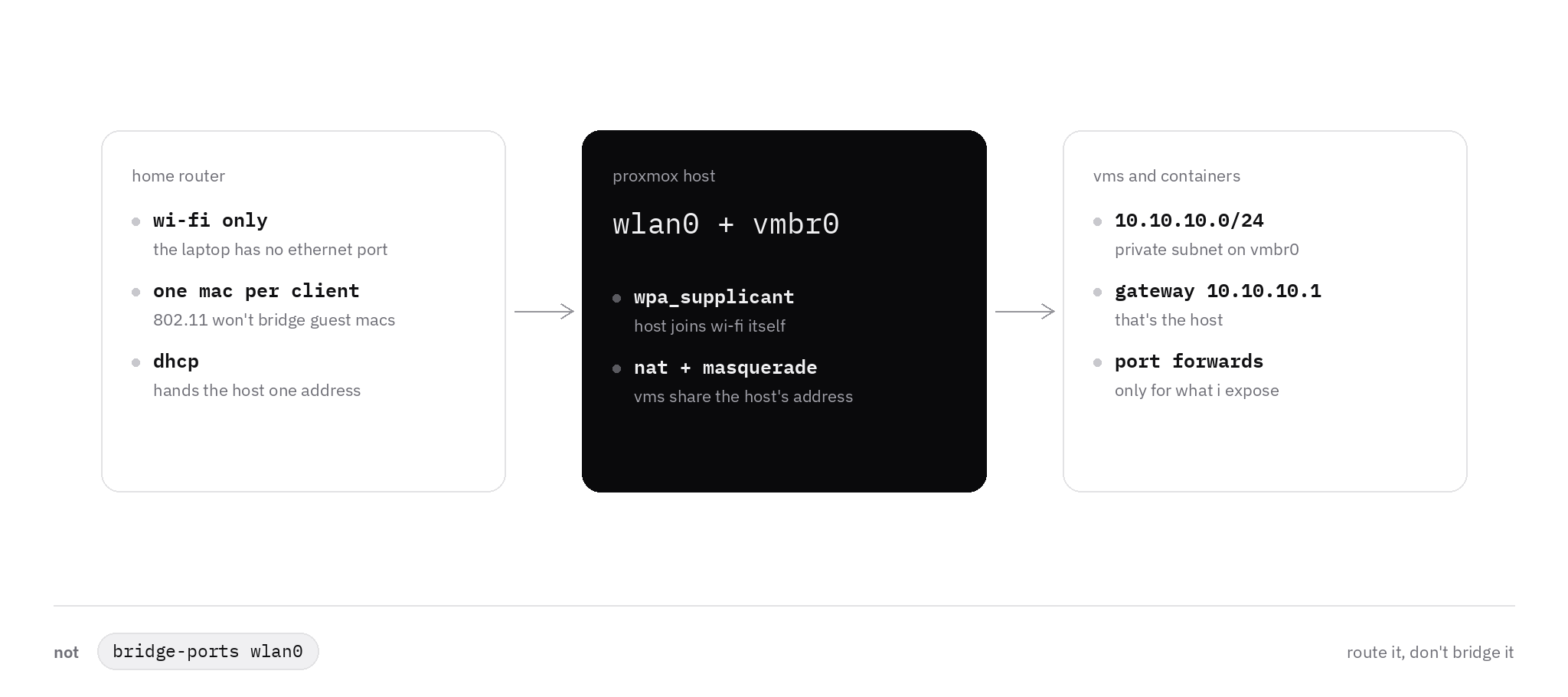
why the bridge fails
A Linux bridge is a virtual switch. The default configuration puts the guest NIC and the physical port on it, and the LAN learns a MAC per guest. 802.11 client mode authenticates one address, so a guest MAC leaving wlan0 is a frame the AP never accepted. The wiki says the bridge forwards that original source, and the AP only knows the host.
The same page lists ebtables, which rewrites the source MAC, and 4-address mode, also called WDS. WDS needs the AP and the card to agree, and the page calls it hit or miss. I use the masquerade example: bridge-ports none, forwarding on, NAT out of the interface the AP already accepted.
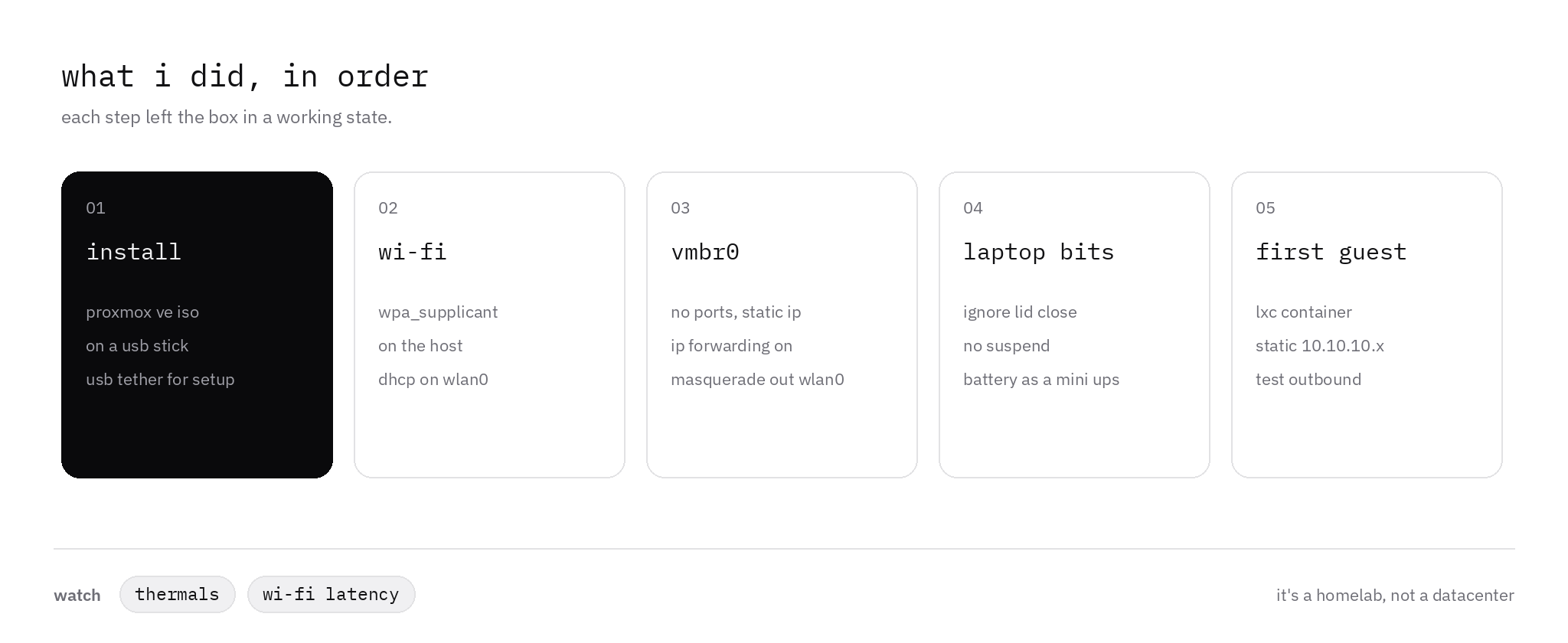
install over a real nic
The evaluation requirements include one network card. The installer marks interfaces that are already up with a filled circle. A wi-fi client that has never associated is not up, and the wizard has nowhere to type an SSID.
A USB ethernet adapter is enough. A phone with USB tethering on also shows up as an ordinary ethernet device, and the UI is port 8006 on that address until wlan0 has its own lease.
I use the 9.2 ISO and the default ext4-on-LVM disk. The requirements page wants more RAM for ZFS and discourages consumer SSDs there. Containers fit this box. A VM needs vmx or svm in /proc/cpuinfo.
the host joins the wi-fi
The WLAN page says to bring wireless up the Debian way, and to leave NetworkManager out.
The name is often wlp2s0, or wlx plus a MAC on a USB stick. ip link is the check. The masquerade rule's -o has to use that same name. The snippets keep wlan0 so they match the figure.
apt install wpasupplicantThe conf file stays mode 600. This is the WPA2-Personal block from wpa_supplicant.conf(5). A WPA3-only AP needs a different key_mgmt. The Debian wi-fi guide Proxmox links can also inline wpa-ssid and wpa-psk. I keep the secret in the conf.
ctrl_interface=DIR=/var/run/wpa_supplicant GROUP=netdev
network={
    ssid="your-ssid"
    scan_ssid=1
    key_mgmt=WPA-PSK
    psk="your-passphrase"
}wpa_passphrase "your-ssid" writes the network block and reads the passphrase from the prompt, so it stays out of shell history.
auto wlan0
iface wlan0 inet dhcp
wpa-conf /etc/wpa_supplicant/wpa_supplicant.confBringing the interface up starts wpa_supplicant and takes a lease. The UI follows that address, still on port 8006. I reserve the lease on the router for the laptop's wi-fi MAC, so the address is the same after a reboot.
vmbr0 with no physical port
vmbr0 stays, with no physical member. Guests attach to the bridge, the bridge holds 10.10.10.1/24, and outbound packets leave as the laptop.
This is the masquerading example, with eno1 renamed to the wi-fi interface. Take the gateway off vmbr0. The installer put one there for the USB NIC, and the default route has to come from DHCP on wlan0.
auto vmbr0
iface vmbr0 inet static
        address 10.10.10.1/24
        bridge-ports none
        bridge-stp off
        bridge-fd 0

        post-up   echo 1 > /proc/sys/net/ipv4/ip_forward
        post-up   iptables -t nat -A POSTROUTING -s '10.10.10.0/24' -o wlan0 -j MASQUERADE
        post-down iptables -t nat -D POSTROUTING -s '10.10.10.0/24' -o wlan0 -j MASQUERADE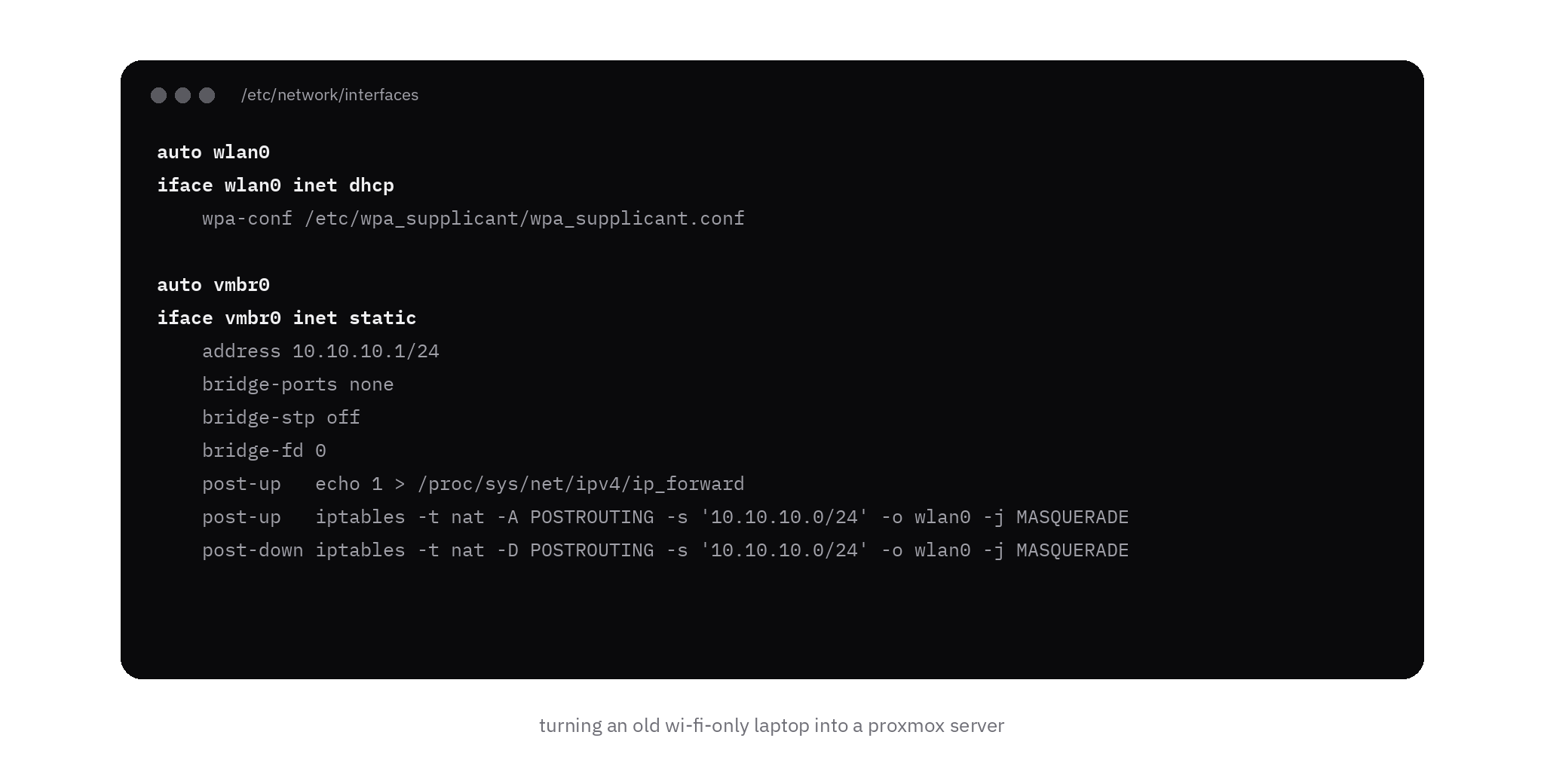
I copy the file, then edit it from the local console, or while the tether is still up. ifreload -a applies a hand edit. ifupdown2 has shipped by default since Proxmox VE 7.0, and the GUI applies interfaces.new from the network panel. A bad edit drops the management address, so the console is the way back.
With the Proxmox firewall on, guest traffic can still die on the way out. The same page adds a conntrack zone so the firewall follows the flow past the VM bridge:
post-up   iptables -t raw -I PREROUTING -i fwbr+ -j CT --zone 1
post-down iptables -t raw -D PREROUTING -i fwbr+ -j CT --zone 1lid, sleep, battery
Closing the lid suspends the machine. logind.conf defaults HandleLidSwitch to suspend. On external power, HandleLidSwitchExternalPower is what applies once you set it, so a laptop that lives on the charger needs that line. The Debian suspend notes use the same file:
[Login]
HandleLidSwitch=ignore
HandleLidSwitchExternalPower=ignore
HandleLidSwitchDocked=ignoresystemctl restart systemd-logind loads it. I also mask sleep.target, suspend.target, hibernate.target, and hybrid-sleep.target, so an idle policy has nothing to start.
The battery covers a short power cut. A cell held at full charge on the adapter ages faster, so I set a charge limit when the firmware exposes one.
A lot of these chassis pull air across the keyboard deck. I keep the lid clear of that vent and watch the node temperature.
the first container
An LXC with a fixed address is the test that the path works. pct takes the same fields as the UI:
pct set 100 -net0 name=eth0,bridge=vmbr0,ip=10.10.10.10/24,gw=10.10.10.110.10.10.1 is that bridge. From inside the container it should answer, then an address past the masquerade. If IPs work and names do not, set nameserver. On create, pct copies the host DNS when that field and the search domain are both empty.
The home LAN cannot see 10.10.10.10. The router has no route to that subnet, and the AP has never heard the guest MAC.
one port, when a service has to be reachable
The network page says incoming access needs port forwarding. DNAT goes in PREROUTING, on the wi-fi interface:
post-up   iptables -t nat -A PREROUTING -i wlan0 -p tcp --dport 8080 -j DNAT --to-destination 10.10.10.10:8080
post-down iptables -t nat -D PREROUTING -i wlan0 -p tcp --dport 8080 -j DNAT --to-destination 10.10.10.10:8080A machine on the LAN opens the laptop's wi-fi address at port 8080, and the guest receives it there. 8006 stays the Proxmox UI on the host. A guest firewall still has to allow the forwarded port.
The WLAN page is plain about the link: latency spikes, less bandwidth, and walls. Light containers are a fair use. Disk traffic and a cluster belong on a cable. A USB ethernet adapter left in place lets vmbr0 become a normal bridge again.
final thought
wlan0 belongs to the host. vmbr0 belongs to the guests. The access point only has to know the one machine that associated.
With the lid no longer suspending the box, and the battery treated as a short outage, the laptop is a small Proxmox node. That is what I wanted from a machine with no ethernet port.