6 min readInfra
i get a phone ping every time someone ssh's into my server
How I get a push notification on my phone whenever someone logs in to my server over SSH, using a PAM hook, a small bash script and ntfy.
I wanted my phone to buzz whenever someone logs in to my server over SSH. Not a daily log summary or an email I read tomorrow, just a push notification that says who logged in and from where.
The setup is small. Every time an SSH session opens, Linux runs it through PAM, the login framework, and PAM can run a script. That script sends a message to ntfy, which pushes it to my phone. My own logins come in over Tailscale without forwarding port 22, so the script skips those. Only logins from somewhere else send a notification.
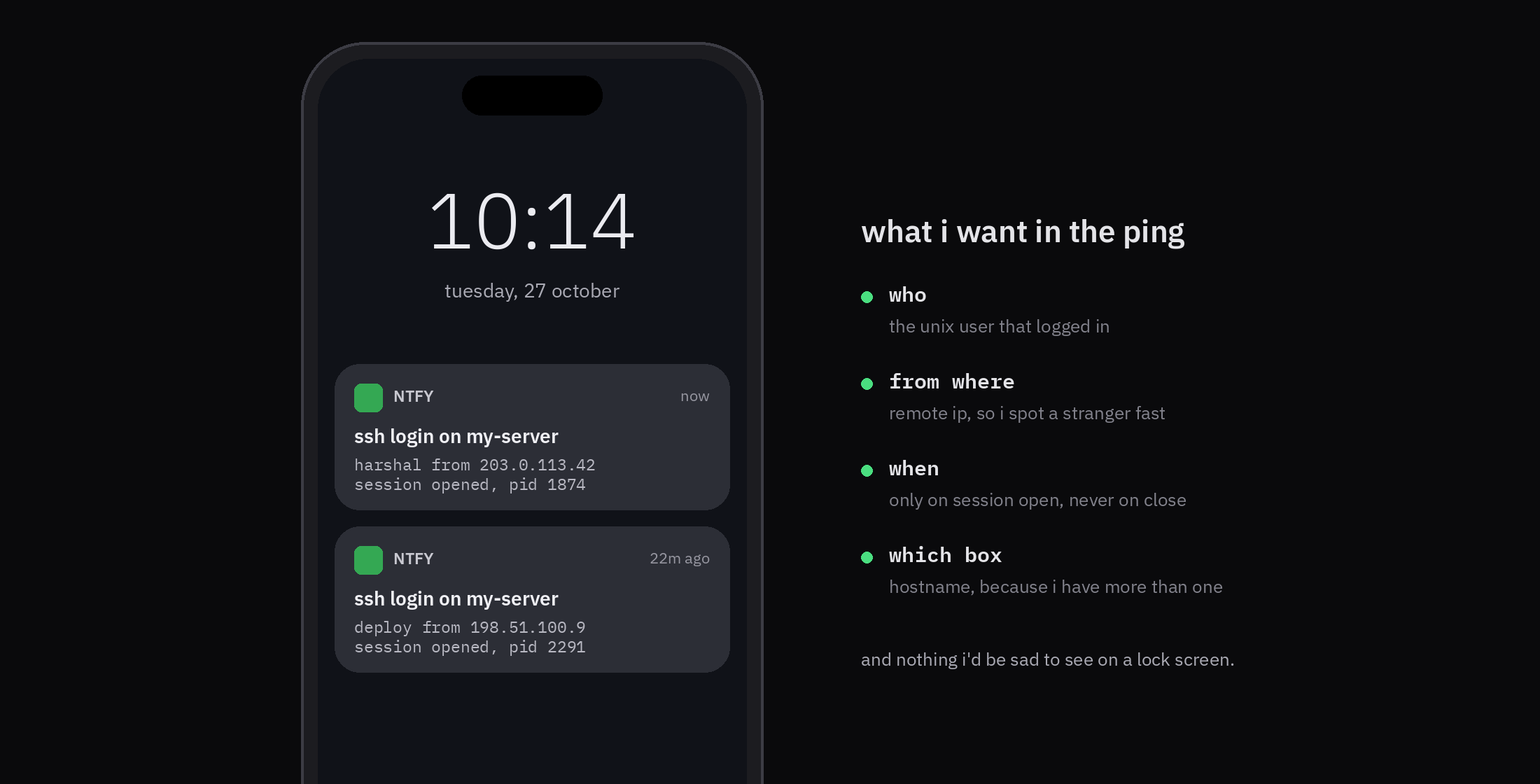
This is a tripwire, not a security control. I'll cover what it misses at the end.
how it works
Login is key only on this server. PasswordAuthentication and KbdInteractiveAuthentication are no, and PubkeyAuthentication is yes.
The part that matters is UsePAM yes. According to the sshd_config(5) man page, it makes sshd run the PAM account and session modules for every kind of login, public key included. Upstream OpenSSH defaults UsePAM to no, but Debian's packaged sshd_config sets it to yes. Check yours before going further.
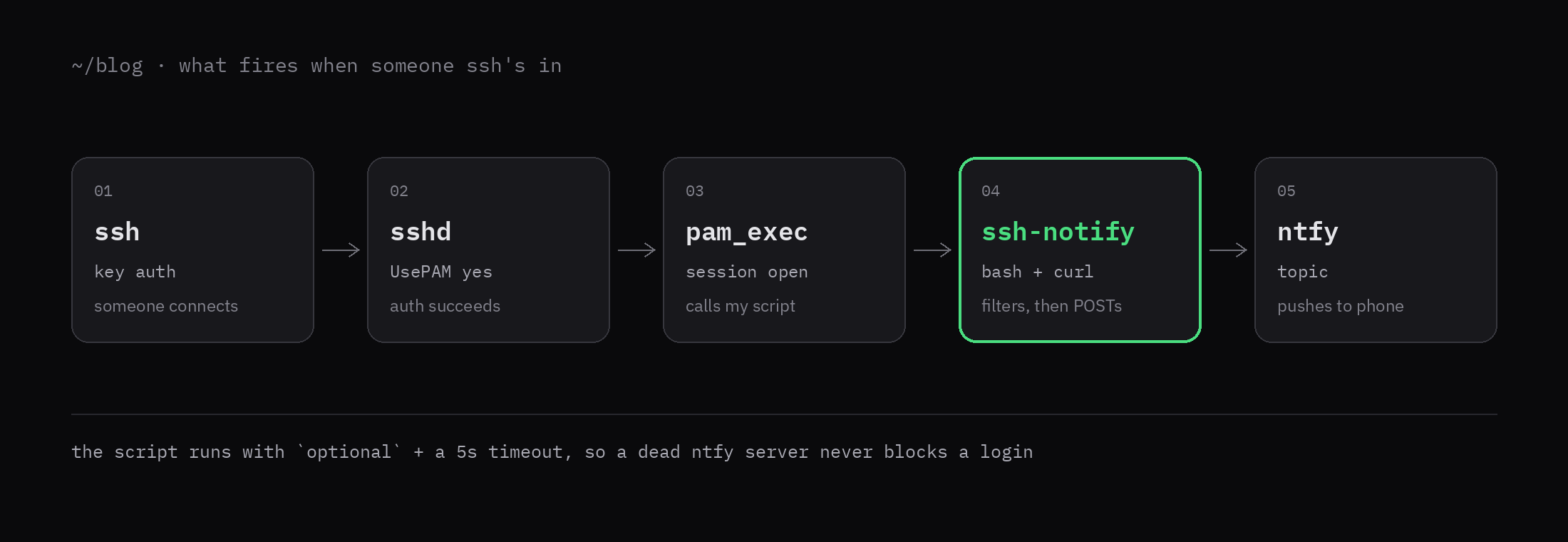
When a session opens, the pam_exec module runs /usr/local/bin/ssh-notify. The pam_exec man page lists the environment variables it gives the script. I use three of them:
PAM_TYPEisopen_sessionorclose_sessionPAM_USERis the user who logged inPAM_RHOSTis the address they came from
what you need
- A Linux server running OpenSSH, and root access to it
- The ntfy app on your phone, subscribed to a topic
curlon the server
step 1: store the ntfy token
The script runs as root, so the token file can be locked down to root only. I keep the token in its own file so it stays out of the script and out of shell history.
sudo install -d -m 700 -o root -g root /etc/ssh-notify
sudo install -m 600 -o root -g root /dev/null /etc/ssh-notify/ntfy.token
sudoedit /etc/ssh-notify/ntfy.tokenPut the token on a single line. The token and the your-topic name in the script below are placeholders for your own.
step 2: write the script
Save this as /usr/local/bin/ssh-notify and make it executable with sudo chmod 755 /usr/local/bin/ssh-notify.
#!/bin/bash
# /usr/local/bin/ssh-notify

log() { logger -t ssh-notify -- "$*"; }

if [[ "${PAM_TYPE:-}" != "open_session" ]]; then
  log "skip session close, not an open"
  exit 0
fi

user="${PAM_USER:-unknown}"
ip="${PAM_RHOST:-unknown}"
user="${user//[$'\r\n']/}"
ip="${ip//[$'\r\n']/}"
host="$(hostname -s 2>/dev/null || hostname)"

# Tailscale: 100.64.0.0/10, and fd7a:115c:a1e0::/48.
if [[ "$ip" =~ ^100\.([0-9]+)\. ]]; then
  second="${BASH_REMATCH[1]}"
  if (( 10#$second >= 64 && 10#$second <= 127 )); then
    log "skip ${user} from ${ip} (tailnet)"
    exit 0
  fi
fi
if [[ "${ip,,}" == fd7a:115c:a1e0:* ]]; then
  log "skip ${user} from ${ip} (tailnet)"
  exit 0
fi

token_file=/etc/ssh-notify/ntfy.token
topic=your-topic
if [[ ! -r "$token_file" ]]; then
  log "fail ${user} from ${ip} -> ntfy token unreadable"
  exit 1
fi
token="$(<"$token_file")"
token="${token//$'\n'/}"

body="${user} from ${ip}
user ${user}, session open"

http_code="$(
  curl --silent --show-error --output /dev/null \
    --max-time 5 \
    --write-out '%{http_code}' \
    -H "Title: ssh login on ${host}" \
    -H "Priority: high" \
    -H "Content-Type: text/plain" \
    -H "Authorization: Bearer ${token}" \
    --data-binary "$body" \
    "https://ntfy.sh/${topic}"
)"
status=$?

if (( status == 28 )); then
  log "fail ${user} from ${ip} -> ntfy timeout (5s)"
  exit 1
fi
if (( status != 0 )) || [[ "$http_code" != 2* ]]; then
  log "fail ${user} from ${ip} -> ntfy ${http_code:-curl ${status}}"
  exit 1
fi

log "sent ${user} from ${ip} -> ntfy ${http_code}"
exit 0Here's what the script does, top to bottom:
- It exits early on
close_session, so you get one ping per login and not two. - It reads the user and the address, and strips newlines from both.
- It skips Tailscale addresses. The ranges are
100.64.0.0/10andfd7a:115c:a1e0::/48, from Tailscale's reserved IP address docs. - It sends the message to ntfy. The publish API takes the token as a
Bearerheader,Titlereplaces the topic name on the lock screen, andPriority: highmakes it pop over other notifications. - It logs the result with
logger -t ssh-notify, so you can read it back withjournalctl -t ssh-notify.
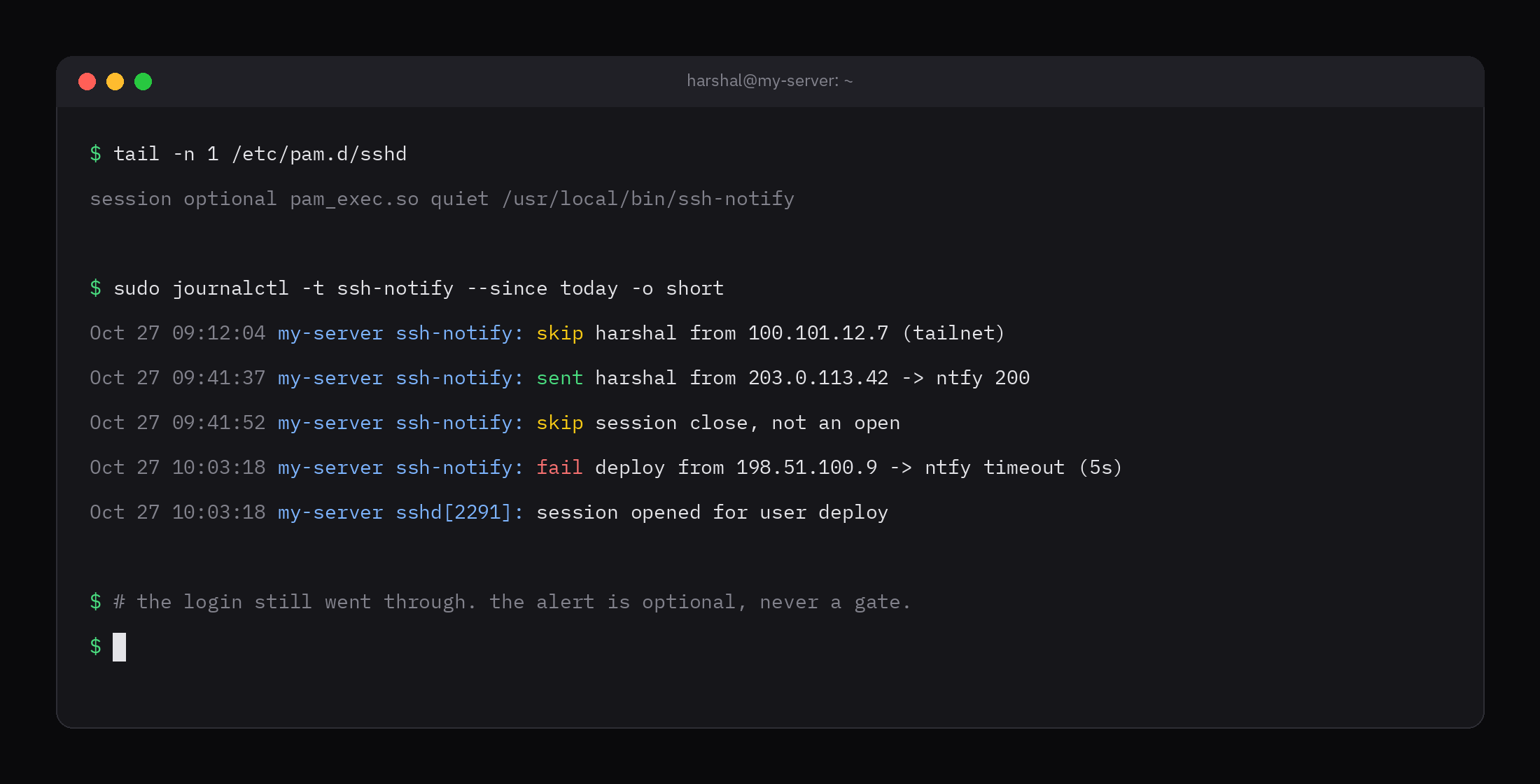
I used --max-time 5 on curl so a slow or dead ntfy server can't hold the login for long. Exit code 28 is curl's timeout. I could have sent curl to the background, but then the log line would be written before the result is known. I'd rather wait the five seconds in the worst case.
step 3: hook it into PAM
Add this as the last line of /etc/pam.d/sshd:
session optional pam_exec.so quiet /usr/local/bin/ssh-notifyTwo words in that line matter.
optional is the important one. According to the pam.conf man page, an optional module's result is ignored unless it's the only module in the stack. If I had used required and the script failed, the login could fail with it. Current OpenSSH restricts the session when PAM fails to open it, and the shell exits with 254. A dead notifier that locks me out of my own server would be worse than no notifier.
quiet keeps the script's exit status out of the login output.
PAM files are read on the next login, so there's no need to reload sshd for this line. Keep a second SSH session open while you test anyway, in case you made a typo.
step 4: test it
Log in from a device that isn't on your tailnet, then check the log:
journalctl -t ssh-notifyYou should see a sent line with ntfy 200, and a notification on your phone. A login over Tailscale should show a skip line and nothing on the phone.
what it misses
A public ntfy.sh topic is readable by anyone who guesses the name. The ntfy docs say the topic name is effectively the password when you don't sign up, and topics there are public. A bearer token looks like authentication, but on ntfy.sh it doesn't give you privacy. Keep the message free of anything you wouldn't want on a lock screen. I only send the user and the address.
It pings once per connection, not once per shell. OpenSSH calls do_pam_session after authentication and before any channel request. So sftp and ssh -N ping too, and the script can't tell them apart from a shell. It's noisier than I wanted.
Failed logins never reach it. A rejected key never opens a session. Something like fail2ban is the tool that sees those.
Root can remove the line. I don't have a fix for this one. Anyone who is already root can edit /etc/pam.d/sshd, so this only notices people who aren't.
The Tailscale skip is address based. 100.64.0.0/10 is shared CGNAT space, so an address in that range isn't proof the login came from my tailnet. Also, if you turn on UseDNS, sshd may pass a hostname instead of an address and the prefix check will miss. It defaults to no, so leave it off.
fix the public topic: self-host ntfy or use pushover
The weak spot in this setup is the public ntfy.sh topic, since anyone who guesses the name can read it. There are two ways to fix that.
The first is to run your own ntfy server and set auth-default-access: deny-all in its config. Then the token is real access control, and nothing goes through a public server.
The second is Pushover, a similar notification service, and it's what I use. It works with accounts and per-app tokens instead of public topics. To switch, replace the curl call in the script with a POST to the Pushover message API. It needs an app token, your user key and a message, and priority=1 is the equivalent of Priority: high:
curl --silent --show-error --output /dev/null \
  --max-time 5 \
  --write-out '%{http_code}' \
  --form-string "token=${app_token}" \
  --form-string "user=${user_key}" \
  --form-string "title=ssh login on ${host}" \
  --form-string "message=${body}" \
  --form-string "priority=1" \
https://api.pushover.net/1/messages.jsonThe app token and user key are both secrets, so keep them in a root-only file like the ntfy token in step 1. The rest of the script stays the same. Pushover's API returns a 200 when it accepts the message, so the 2* check on the status code still works.