how i keep my ai api keys from leaking
The places an OpenAI, Anthropic, or Gemini key leaks from a Next.js app, the server route that holds the only copy, and the order to follow when one gets out.
I keep the OpenAI key in .env on my laptop. The file is gitignored. That still leaves a lot of ways for it to get out.
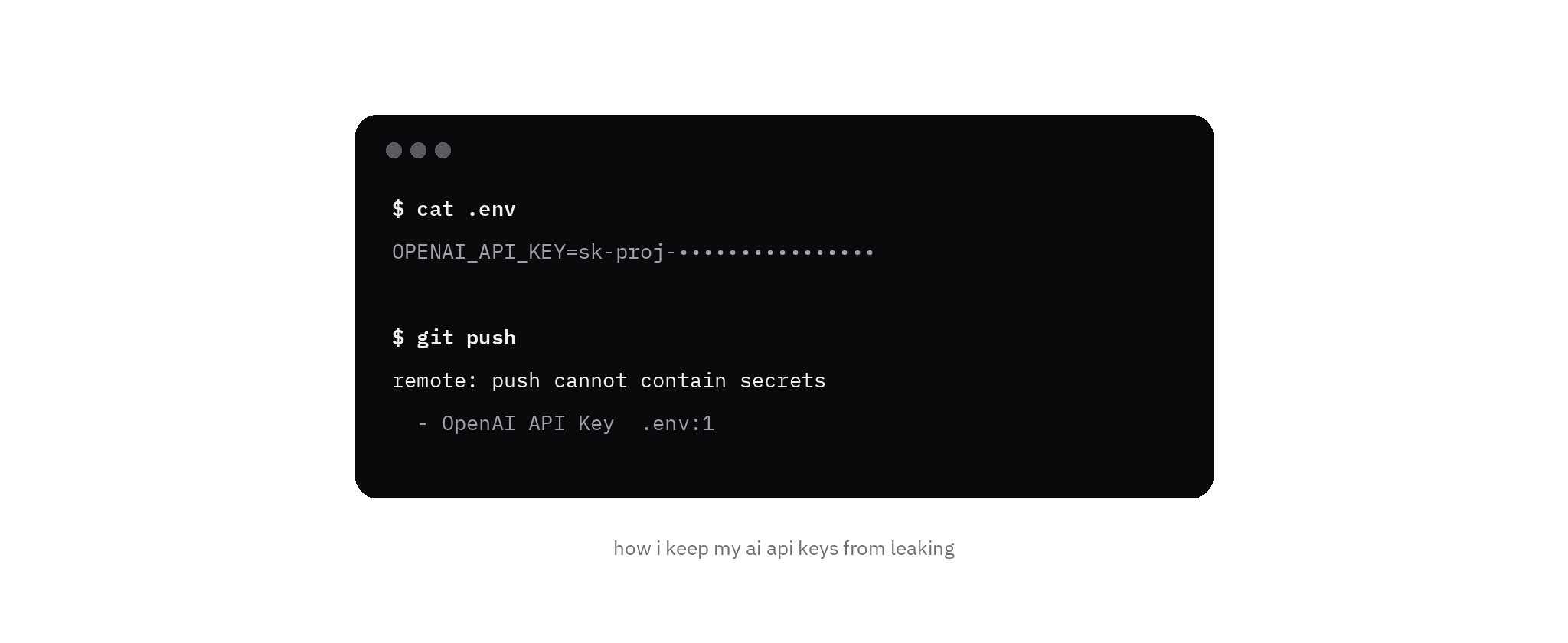
The close call is the obvious one. git add . on a tired afternoon, and the ignore rule was wrong. The push in the figure never lands. The remote stops it and points at the OpenAI key on line 1 of .env.
The leaks I worry about happen earlier, or somewhere a scanner is not looking. GitGuardian's State of Secrets Sprawl 2026 counted 28.65 million new hardcoded secrets in public GitHub commits in 2025, up 34% year over year. AI-service secrets were 1,275,105 of those, up 81%. The report's plain conclusion matches the week I had: the leak still goes through a person in a hurry.
where they actually leak
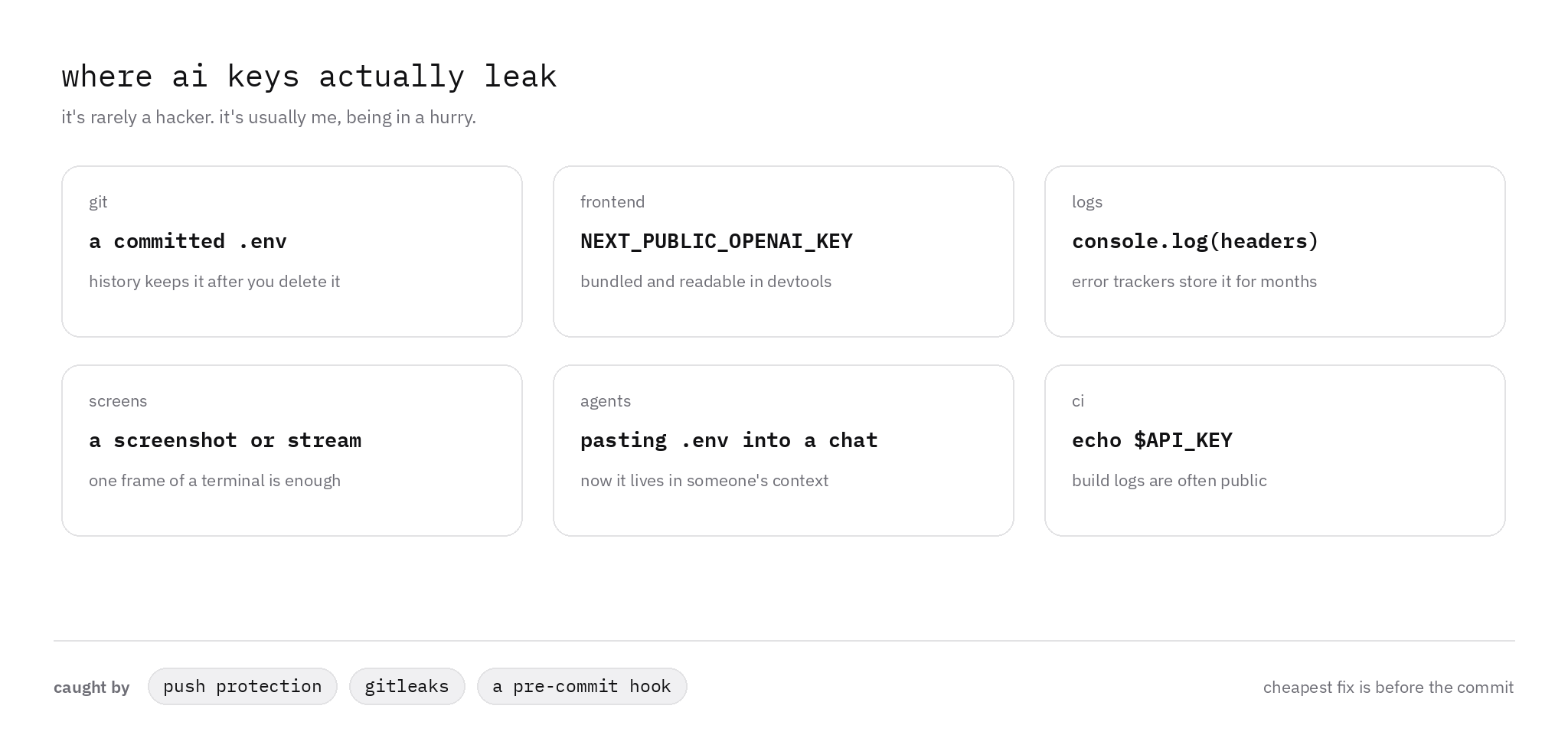
Git keeps a committed .env after I delete the file. GitHub's removal guide says to revoke or rotate the secret first. A rewrite still leaves the old commit in any clone.
The frontend bundle is the Next.js version of the same mistake. Every NEXT_PUBLIC_ value is inlined into browser JavaScript at next build. The env docs say that outright, so NEXT_PUBLIC_OPENAI_KEY is readable in devtools. OpenAI and Gemini both say the call from a browser or a mobile app has to go through my own backend.
console.log(headers) on the route that just set Authorization writes the bearer token into whatever stores that line. Sentry's default scrubbing redacts values whose names look like api_key, token, auth, or secret. A header printed as one string can miss that list, and events already stored stay stored. Error retention is 90 days on Team, Business, and Enterprise, and 30 days on the Developer plan.
A screen is one frame. A screenshot, a stream, or a recording of cat .env outlives the file.
A chat is worse, because I handed the key over. Anthropic's key guide says a third-party tool that receives the key has the console. GitGuardian found 24,008 unique secrets in MCP config files on public GitHub, 2,117 of them still valid, often from a setup guide that says to paste the key into the file.
CI is echo $API_KEY. Logs on a public repository are visible to anyone signed in to GitHub. Actions redacts registered secrets, and the secure-use guide says that redaction fails once the value is transformed. An unredacted line means delete the log and rotate the key.
The cheapest fix is the one that runs before the commit.
the key lives on the server
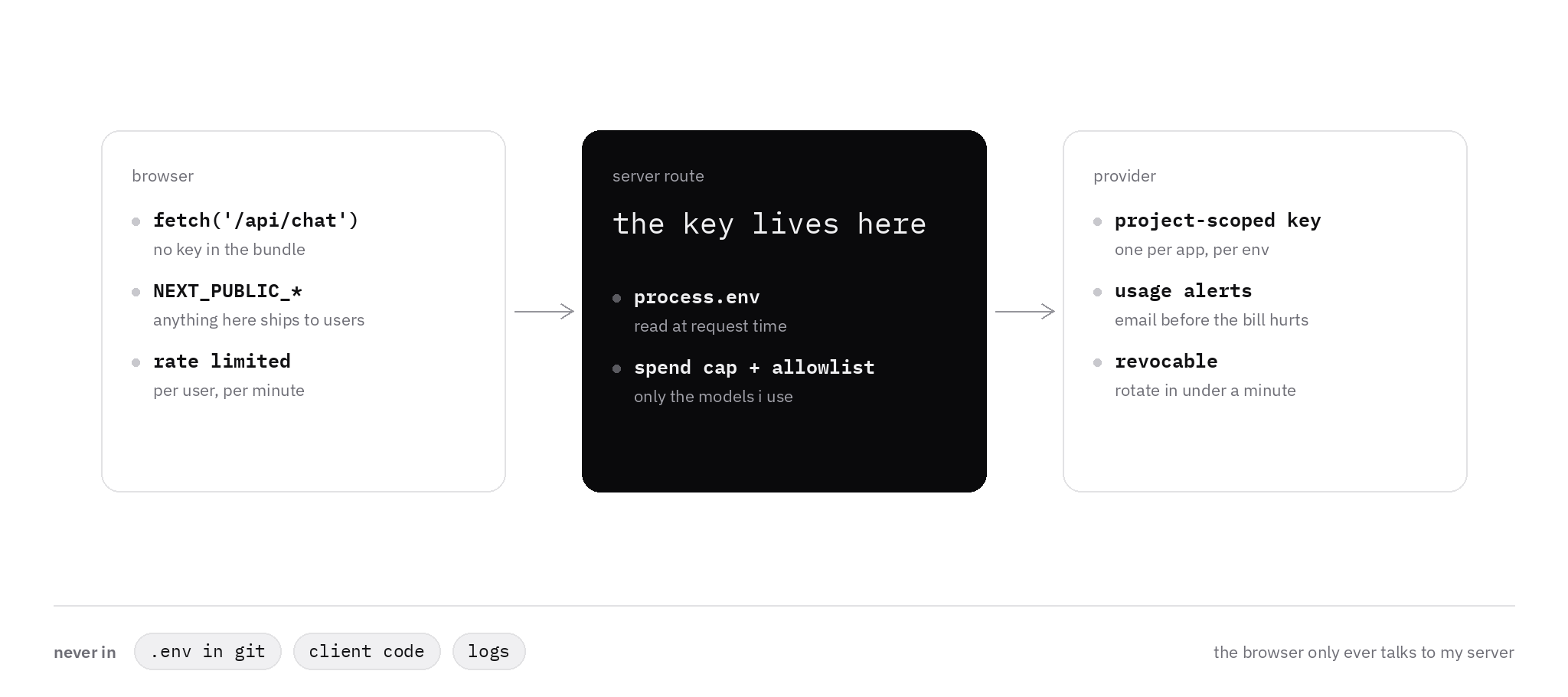
The browser calls my route. The route calls the provider. process.env.OPENAI_API_KEY is read on the server when the request runs, so a rotation shows up on the next deploy and the value stays out of the bundle.
await fetch("/api/chat", {
  method: "POST",
  headers: { "Content-Type": "application/json" },
  body: JSON.stringify({ prompt }),
});// app/api/chat/route.ts
export async function POST(request: Request) {
const key = process.env.OPENAI_API_KEY;
if (!key) {
return Response.json({ error: "missing key" }, { status: 500 });
}
const { prompt } = await request.json();
const upstream = await fetch("https://api.openai.com/v1/chat/completions", {
method: "POST",
headers: {
Authorization: `Bearer ${key}`,
"Content-Type": "application/json",
},
body: JSON.stringify({
model: "gpt-4o",
messages: [{ role: "user", content: prompt }],
}),
});
const data = await upstream.json();
return Response.json({
text: data.choices?.[0]?.message?.content ?? "",
});
}I rate-limit that route per user, per minute. On a serverless host the counter has to live in shared storage.
The model string is one the project is allowed to call. OpenAI's project limits set which models a project can use, and a rate limit on each. That setting is under Managing projects.
NEXT_PUBLIC_ is for an analytics id. A model key stays on the server.
one key per app, per environment
I create the OpenAI key inside the project, with an expiration, and I use a service account that cannot leave that project. The key safety guide says to rotate by creating the replacement, updating the app, and revoking the old key once the new one answers. Their note on sharing a personal key says to keep a distinct key per project, staging included.
Anthropic's split is development, testing, and production, so one leak disables one use case. A workspace can cap monthly spend and email me at a threshold. The Default Workspace cannot take those limits. Workspaces is the page.
A Gemini key belongs to a Google Cloud project. Since May 28, 2026, new keys in AI Studio are authorization keys, restricted to the Gemini API. Billing alerts are the mail I want before the invoice. Using Gemini API keys was updated on October 6, 2026.
An alert and a hard cap are different switches. On OpenAI, an alert sends mail and traffic continues. A hard limit returns 429 with project_spend_limit_exceeded or organization_spend_limit_exceeded. Enforcement lags, so spend can pass the number by a little. I follow Spend limits: email first, then a cap I can live with if the key is copied. Revoking that key is a minute in the same dashboard.
catch it before the commit
Gitleaks scans what I am about to commit. v8.30.1 came out on March 21, 2026. The readme pins it like this:
repos:
  - repo: https://github.com/gitleaks/gitleaks
    rev: v8.30.1
    hooks:
- id: gitleaksSKIP=gitleaks skips the hook, so I keep a second check. TruffleHog is the one that asks the provider whether a match is still live. The pre-commit docs use:
trufflehog git file://. --since-commit HEAD --results=verified,unknown --failPush protection is the remote. It blocks a recognized secret from the command line, the GitHub UI, the REST API, and the GitHub MCP server on public repositories. The docs say the user setting is on by default and covers public repositories. The repository setting stays off until someone enables it, and it needs GitHub Secret Protection.
On October 7, 2026, GitHub wrote that push protection had blocked a secret at least once a second over the previous month, and that partner issuers, OpenAI among them, revoke tokens that public scanning reports. That is Secret protection must scale with software. Anthropic deactivates a Claude key found on public GitHub and emails you. The hook still matters on a private repo where repository push protection is off.
when one leaks anyway
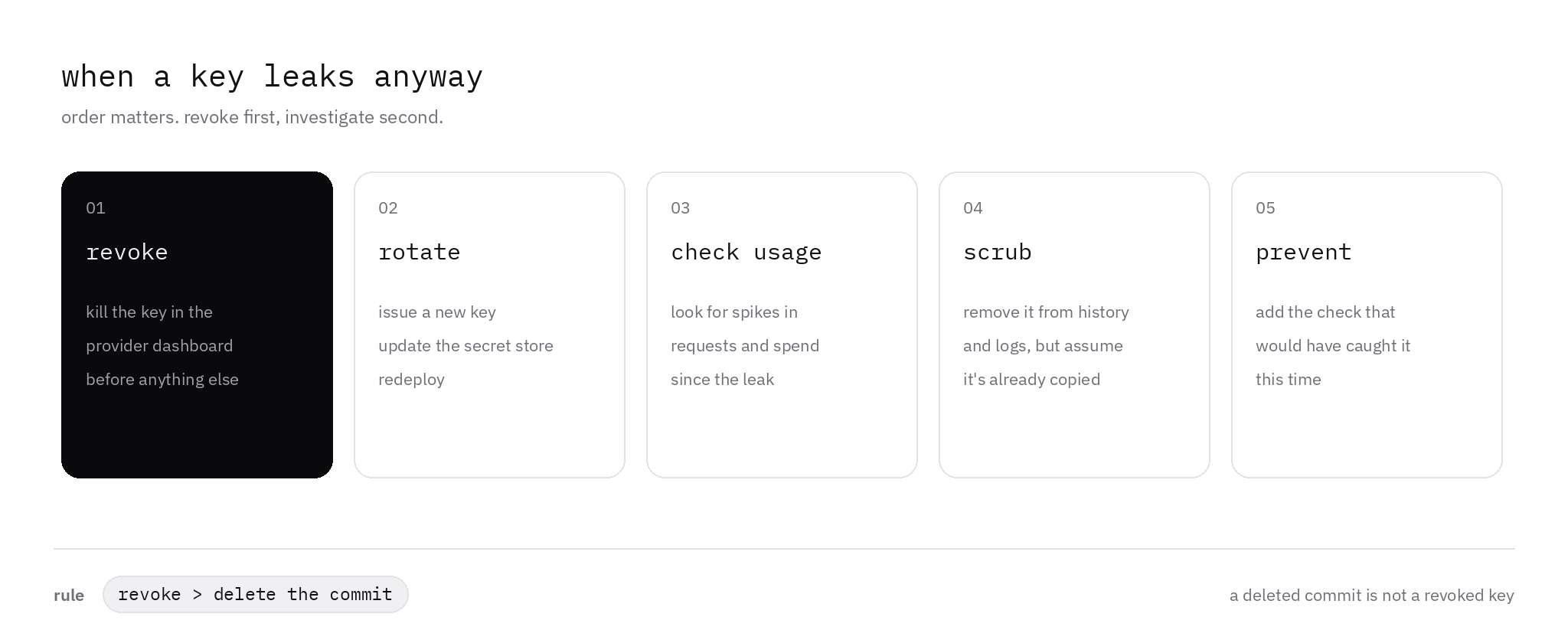
Revoke first. Look around second. A deleted commit leaves a working key.
-
revoke. Kill the key in the dashboard before I open git. Anthropic says to delete it on the API keys page immediately. OpenAI says to rotate it from the API keys page as soon as a leak is plausible. Gemini's checklist swaps the first two steps on purpose: create the replacement, deploy it, then disable the old key, so the app stays up. The history rewrite still waits.
-
rotate. New key, secret store, redeploy. OpenAI's rotation note ends by revoking the old key once the new one is verified.
-
check usage. Look for a spike since the leak. OpenAI has a Usage page. Anthropic has Logs and Usage. Gemini says to read billing and API usage in the Cloud console.
-
scrub. Remove it from history and from logs, and assume a copy already exists. A rewrite misses other clones, forks, pull request refs, and cached views. An unredacted Actions log gets deleted too.
-
prevent. Add the check that would have caught this one. The ignore rule, the hook, push protection, or the
console.logof the header.
final thought
The key is a password that spends money while I sleep.
Mine sits in one server route, on a project key, with an alert in front of a hard cap. The browser only talks to that route. The hook is there for the afternoon git add . gets ahead of me.
If one still gets out, I kill it in the dashboard before I touch the history.