4 min readTools
bun check is the typecheck command worth adding
Bun 1.4.3 ships bun check, a TypeScript 7 type checker inside the runtime. What it replaces, what it leaves alone, and how to run it before tests and CI.
Type checking is the slow part.
The app can run TypeScript without a compile step. The check is separate. tsc --noEmit reads the project, prints errors, and writes nothing. Put that at the front of CI, or in a hook, and it is often the step you wait on.
Bun 1.4.3, released on October 10, 2026, adds bun check for that step.
what it does
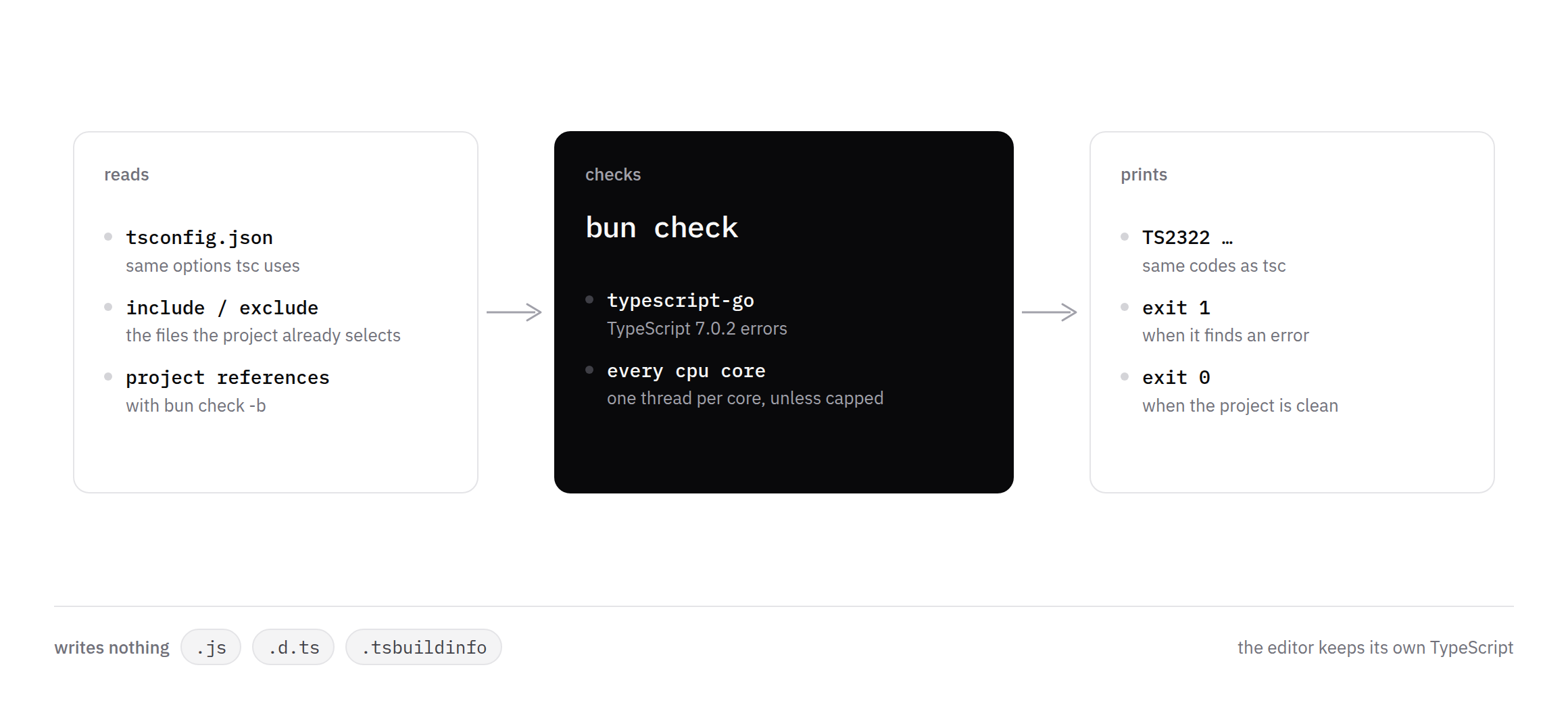
bun check is a port of typescript-go. It reads tsconfig.json, checks the files that config already selects, and uses every CPU core. The docs say it aims to report the same errors as tsc from TypeScript 7. The release notes say it passes all 51,210 tests in the TypeScript 7.0.2 conformance suite.
You do not need the typescript package installed for the check. Bun ships the lib declaration files itself.
It only type checks. No JavaScript. No .d.ts files. No .tsbuildinfo. No language server. If a package needs generated declarations, tsc still does that job. The editor keeps its own TypeScript either way.
the script name matters
For one project, this is the swap.
{
  "scripts": {
    "typecheck": "bun check"
  }
}bun check -p packages/web checks one package. bun check -b follows project references, the same way tsc -b does. It reads those projects from source, so you don't have to build them first.
Name the script typecheck.
If package.json already has a check script, plain bun check runs that script, the same way bun run check does.
A repo on Biome might already use check for lint. Inside that script, bun check means the type checker, which is how "check": "bun check" can work.
An older Bun, including one that shows up first from node_modules/.bin, has no type checker. "check": "bun check" on that install calls itself again.
The docs say to use typecheck unless everyone is on 1.4.3 or newer.
bun --check, with the flag, is the type checker even when a check script exists.
typescript 7 shows up anyway
bun check follows TypeScript 7, whichever typescript version is sitting in node_modules.
Three defaults are the ones that change a TypeScript 5 repo.
strict is on, so implicit any starts failing.
types starts empty. @types packages load only if you list them. process or describe can disappear until the config has something like "types": ["node"].
A few options are gone. "moduleResolution": "node", "baseUrl", and "target": "es5" make the checker stop before it looks at your files. tsc from TypeScript 7 stops the same way.
The migration table is short. I would run through it before pointing CI at the new command. To keep the editor on the same errors, install the TypeScript version Bun is matching. process.versions.typescript prints it.
Side-effect imports such as import "./index.css" need a declaration. Bun can import the CSS. TypeScript still wants declare module "*.css" {} in a .d.ts file.
check, then continue
The flag is the form I would use locally.
bun --check src/index.ts
bun test --check
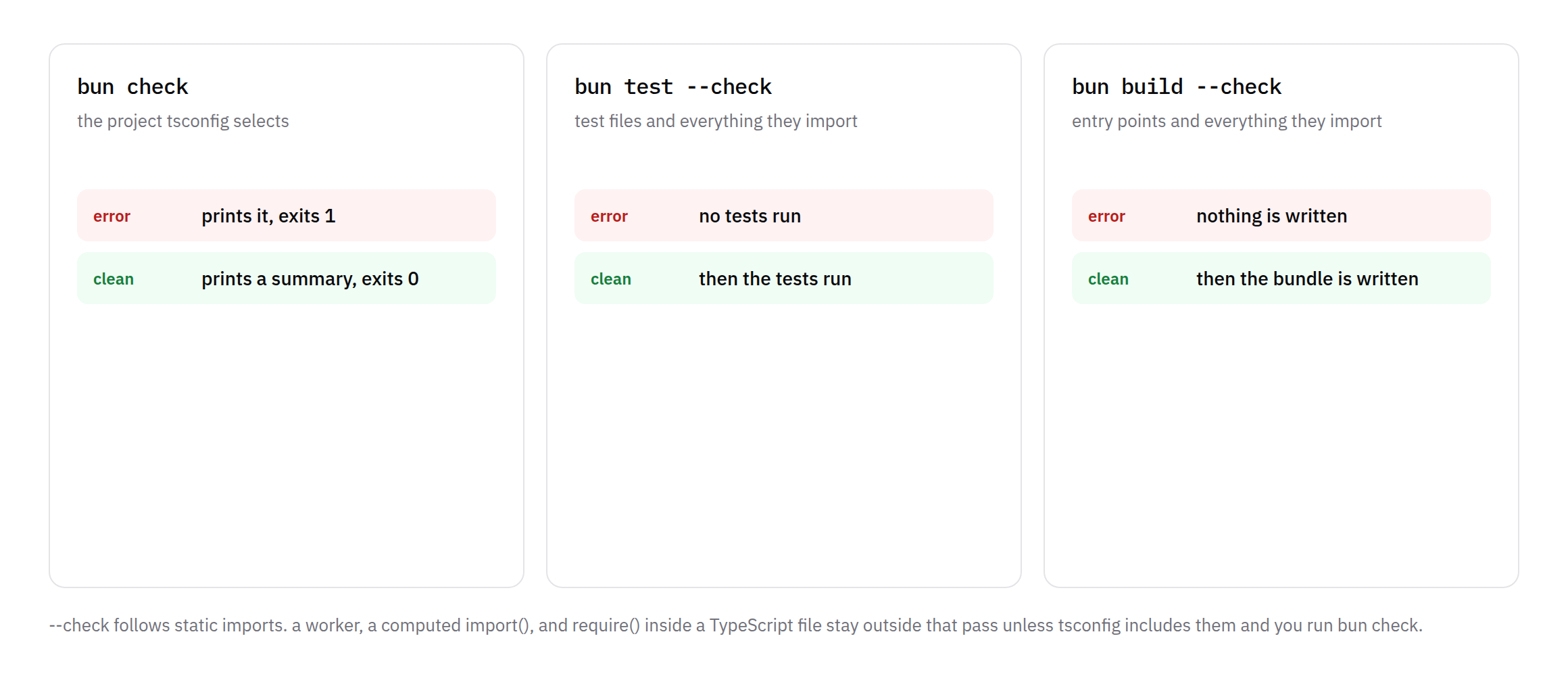
bun build --check ./src/index.ts --outdir outA type error prints, the process exits 1, and the next step doesn't start. The file doesn't run. The tests don't run. The bundle isn't written. bun run --check dev checks the whole project before the script. With --watch, it checks again before every restart.
--check follows static imports. It misses a worker created with new Worker("./worker.ts"), a computed import(), and require() in a TypeScript file. bun check still sees those files when tsconfig.json includes them.
in ci
Install dependencies, then run the checker. A type error fails the job. On GitHub Actions, bun check also prints workflow commands, so the errors show up on the pull request diff. There is no problem matcher to add.
name: Type check
on: [push, pull_request]

jobs:
  typecheck:
    runs-on: ubuntu-latest
    steps:
      - uses: actions/checkout@v4
      - uses: oven-sh/setup-bun@v2
      - run: bun install --frozen-lockfile
- run: bun checkTwo details are easy to miss. There is no .tsbuildinfo to cache. Every run checks the whole project. And an empty run fails. A job that starts in the wrong directory exits 1.
When the output is not a terminal, errors are one line each, in the tsc --pretty false shape. A script that already parses tsc can keep parsing.
If AGENT=1 or CLAUDECODE=1 is set, each error comes back as a tagged block with the source lines. That is the shape a coding agent can read without scraping ANSI.
--threads defaults to one per core. bun check --threads 4 is there when a shared runner should use less of the machine.
the numbers bun published
The release notes compare bun check with tsc 7.0.2 on a 16-core Apple silicon Mac.
Next.js packages/next, 2,881 files, went from 1.82s to 0.28s. VS Code src, 9,795 files, went from 5.98s to 1.24s. Nuxt, 839 files, went from 0.80s to 0.27s. Across the projects they listed, the range is about 3x to 6.4x, with about 2.2x to 4.9x less memory.
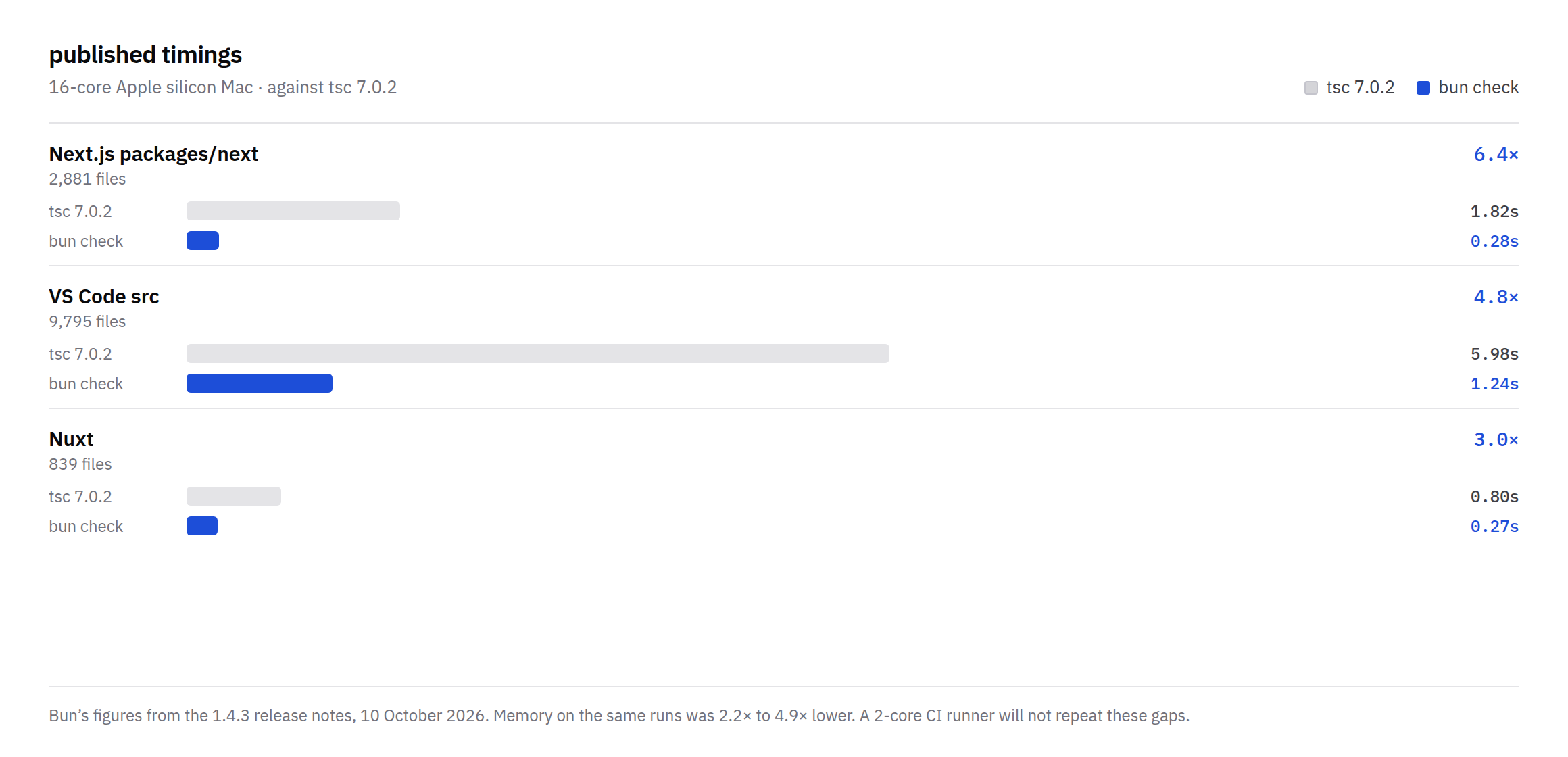
Those are Bun's numbers, on that machine. A 2-core CI runner will not repeat a 6.4x gap. I would run both commands on the repo once and compare the errors before letting CI depend on bun check alone.
final thought
bun check answers one question. Does this project typecheck?
If it does not, the test run and the bundle should wait. That was already the point of tsc --noEmit. The new part is a checker that is fast enough to put in front of those steps, and aimed at the same errors as TypeScript 7.
I would add a typecheck script, run it beside the old command once, and only then let CI depend on it.