Making Dynamic MDX Blogs Work with OpenNext on Cloudflare Workers
A simple way to fix MDX blog pages that work locally but render empty on Cloudflare Workers with OpenNext.
I ran into a small but annoying problem while deploying a Next.js MDX blog to Cloudflare Workers with OpenNext.
The blog worked locally. The build passed. OpenNext even listed the blog routes during the build.
Then I opened the deployed site, and the blog page was empty.
The issue was not MDX. It was not frontmatter. It was not a missing route. The real problem was that my blog code was still thinking like a normal Node.js app, while Cloudflare Workers runs from a bundled Worker output.
The Short Version
If your MDX blog works in next dev but shows empty pages or missing posts on Cloudflare Workers, check if you read blog files with node:fs at request time.
This is the safer pattern:
- Keep writing posts as
.mdxfiles. - Parse the files during the build.
- Generate a small TypeScript file with post metadata.
- Generate another TypeScript file that statically imports every MDX post.
- Render posts from that generated registry in production.
That way the Worker does not need to scan your content/blog folder at runtime.
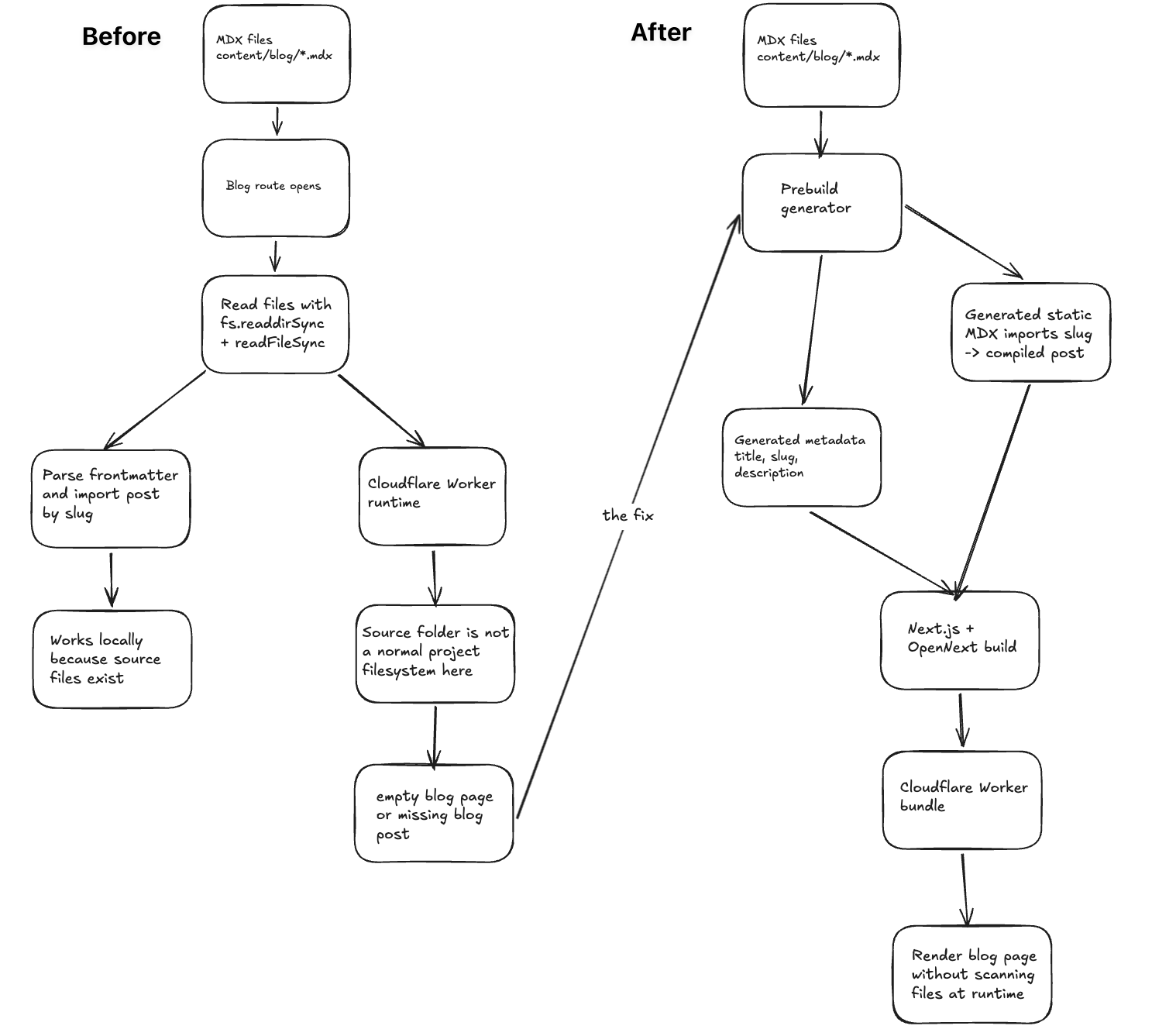
What Broke
The old setup looked something like this:
import fs from "node:fs";
import path from "node:path";
import matter from "gray-matter";

const postsDir = path.join(process.cwd(), "content", "blog");

export function getAllPosts() {
  return fs.readdirSync(postsDir).map((file) => {
    const raw = fs.readFileSync(path.join(postsDir, file), "utf8");
    const { data } = matter(raw);

    return {
      slug: file.replace(/\.mdx$/, ""),
      title: data.title,
      description: data.description,
    };
  });
}This feels fine in local development because the source files are right there on disk.
But after OpenNext builds the app for Cloudflare Workers, the app is running from a Worker bundle. Cloudflare does support node:fs through a virtual filesystem, but that filesystem is not the same as having your project folder mounted in production. Files inside the Worker bundle are readable under /bundle, and /tmp is temporary for a request.
So I stopped treating the source folder as runtime data.
The Fix
I moved blog discovery to build time.
The build step reads the MDX files once, parses the frontmatter, and writes generated TypeScript files that the app can import normally.
The mental model is simple:
Authoring:
  content/blog/*.mdx

Build:
  read MDX files
  parse frontmatter
  generate metadata
  generate static imports

Runtime:
  import generated modules
render the matching MDX componentThis keeps the nice file-based writing flow, but removes runtime filesystem reads from the deployed Worker.
Step 1: Generate Blog Metadata
I use a script before the build. It reads the .mdx files and creates metadata for the blog index, sitemap, RSS feed, and page metadata.
// scripts/generate-blog-data.mjs
import fs from "node:fs";
import path from "node:path";
import matter from "gray-matter";

const root = process.cwd();
const postsDir = path.join(root, "content", "blog");
const outputDir = path.join(root, "src", "lib", "blog");

const files = fs.readdirSync(postsDir).filter((file) => file.endsWith(".mdx"));

const posts = files.map((file) => {
  const slug = file.replace(/\.mdx$/, "");
  const raw = fs.readFileSync(path.join(postsDir, file), "utf8");
  const { data, content } = matter(raw);

  const words = content.trim().split(/\s+/).filter(Boolean).length;

  return {
    slug,
    title: data.title,
    description: data.description,
    date: data.date,
    readingTime: `${Math.max(1, Math.ceil(words / 225))} min read`,
  };
});

fs.mkdirSync(outputDir, { recursive: true });

fs.writeFileSync(
  path.join(outputDir, "generated-posts.ts"),
  `export const allBlogPosts = ${JSON.stringify(posts, null, 2)} as const;\n`
);The important part is not the exact script. The important part is when it runs.
It runs before next build, not when someone opens /blog.
Step 2: Generate Static MDX Imports
The next file is the one that makes the Worker build reliable.
Instead of doing this:
await import(`../../../content/blog/${slug}.mdx`);I generate static imports:
// src/lib/blog/generated-components.ts
import type { ComponentType } from "react";

import Post0 from "../../../content/blog/first-post.mdx";
import Post1 from "../../../content/blog/second-post.mdx";

const blogPostComponents: Record<string, ComponentType> = {
  "first-post": Post0,
  "second-post": Post1,
};

export function getPostComponent(slug: string) {
  return blogPostComponents[slug] ?? null;
}This gives Next.js and OpenNext a clear import graph. They can see the MDX files, compile them, and include them in the Worker output.
That is much easier to trust than a variable import path.
Step 3: Render From the Registry
The blog route becomes a lookup, not a file scan.
import { notFound } from "next/navigation";
import { getPostComponent } from "@/lib/blog/generated-components";
import { allBlogPosts } from "@/lib/blog/generated-posts";

export function generateStaticParams() {
  return allBlogPosts.map((post) => ({ slug: post.slug }));
}

export default async function BlogPostPage({ params }) {
  const { slug } = await params;
  const post = allBlogPosts.find((item) => item.slug === slug);
  const PostContent = getPostComponent(slug);

  if (!post || !PostContent) {
    notFound();
  }

  return (
    <article>
      <h1>{post.title}</h1>
      <p>{post.description}</p>
      <PostContent />
    </article>
  );
}Now the production route only depends on bundled code.
No fs.readdirSync. No process.cwd(). No runtime gray-matter.
Step 4: Run the Script Before Every Build
I wired the generator into the build scripts:
{
  "scripts": {
    "prebuild": "node scripts/generate-blog-data.mjs",
    "build": "next build",
    "prebuild:cf": "node scripts/generate-blog-data.mjs",
    "build:cf": "opennextjs-cloudflare build -c wrangler.jsonc"
  }
}Now when I add a new .mdx file, the next build updates the generated metadata and component registry.
I still get the same writing flow:
content/blog/my-new-post.mdxBut the deployed Worker gets predictable imports.
Step 5: Test the Worker Build
I do not stop at next build for this kind of bug.
next build can pass while the Worker output still behaves differently. So I check the Cloudflare build too:
pnpm build:cfThen I preview the Worker locally:
pnpm exec opennextjs-cloudflare preview -c wrangler.jsoncAnd I test three routes:
curl -I http://localhost:8787/blog
curl -I http://localhost:8787/blog/my-real-post
curl -I http://localhost:8787/blog/not-a-real-postThe result I want:
/blog                 200
/blog/my-real-post    200
/blog/not-a-real-post 404The fake post matters. A working blog should render real posts and still reject bad slugs.
Quick Debug Checklist
- Does any blog route import
node:fs? - Does
/blogcallfs.readdirSyncduring a request? - Does the post page use a variable MDX import path?
- Does the generated registry include every
.mdxfile? - Does
pnpm build:cflist the expected blog routes? - Does the local Worker preview return
200for a real post? - Does it return
404for a fake post?
Where the Content Lives
The full post content still lives in MDX files.
The generated metadata file only stores things like:
- slug
- title
- description
- date
- reading time
- headings, if you need a table of contents
I do not put the whole article body into JSON. That gets messy fast, especially with code blocks, custom MDX components, and imports.
Instead, the body is compiled from the MDX module:
content/blog/my-post.mdx
        |
        v
import Post from "../../../content/blog/my-post.mdx"
        |
        v
<Post />That is the clean split:
- metadata is generated as plain data
- content is rendered as compiled MDX
A Small SEO Note
The technical fix gets the pages to render. SEO still depends on whether the page is useful.
For this kind of technical post, I try to keep the basics simple:
- use a clear title
- describe the problem in the first few lines
- use short sections
- write headings that say what the section is about
- add examples that someone can copy into their project
- link to the official docs when they matter
- avoid padding the post to hit a word count
That last point is important. Google does not require a magic word count. A shorter post that solves the problem is better than a long post that makes the reader dig.
Final Thought
The fix was mostly a change in where the work happens.
Before, the Worker had to discover blog files at request time.
After, the build discovered the files once, generated a registry, and gave the Worker normal imports to render.
That made the blog simple again. I can still add posts as .mdx files, but production no longer depends on reading my source folder at runtime.